We need a name for our new board game
We painstakingly put together this prototype in just under 10 mins.

“...I've been working since 2008 with Ruby / Ruby on Rails, love a bit of Elixir / Phoenix and learning Rust. I also poke through other people's code and make PRs for OpenSource Ruby projects that sometimes make it Currently working for GenieBelt who are based in Copenhagen, Denmark ...”
We painstakingly put together this prototype in just under 10 mins.
We have recently been looking at hiring so I created a stupid question just to get a developer talking. When I first started working with Rails we were building Euro-reg.com with Ruby 1.8.6 and Rails 1.2.3 as far as I can recall. So the question ended up being…
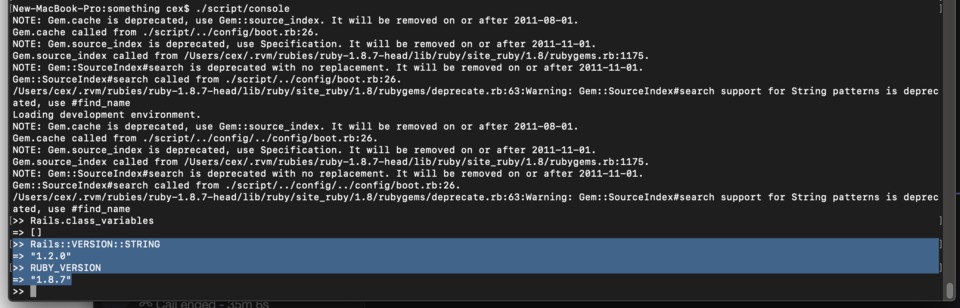
Suppose we hired you and on day one said we have this Rails 1.2 Application on Ruby 1.8.7, using SQLite in production that is mission critical. How would you approach bringing it up to date?
Some feedback we got was “…Rails v1.0—2.1 are incompatible with Ruby v1.8.7…” which made me question my stupid question. Actually it’s been so long I can’t even remember. So 10 minutes later.
The flow was
That was nicely quick, I guess it could have been horrible.
Have you ever come across some files in your application that just appear to be generated by err…..a generator and actually do nothing. Well I find a couple of javascript files with the same content (and therefore the same size) and wondered if there were any more.
# Place all the behaviors and hooks related to the matching controller here.
# All this logic will automatically be available in application.js.
# You can use CoffeeScript in this file: http://jashkenas.github.com/coffee-script/
Well fortunately you can use find with a specific option
Robs-MBP:blah rl$ find app/assets/ -size 229c
app/assets//javascripts/some.js.coffee
Excellent, I can ditch that file too then.
I came across a weird HAML syntax in a client codebase that I was just confused about.
Haml::Engine.new(%q{
- title = '1'
.title== #{title}<br/>
}).to_html
=> <div class='title'>1<br/></div>
I found an alternative syntax, I am not sure I like it but it’s certainly better than the above.
Haml::Engine.new(%q{
- title = '1'
.title<
 #{title}
 %br>
}).to_html
=> <div class='title'>1<br></div>
Basically you can kill whitespace with < >
If you want to search your bundle for anything in particular, in this case the deprecated Digest::Digest syntax
New-MacBook-Pro:that cex$ bundle show --paths | xargs grep -r Digest::Digest
/Users/cex/.rvm/gems/ruby-2.2.10@that/gems/aws-sdk-1.6.4/lib/aws/core/signer.rb:        OpenSSL::HMAC.digest(OpenSSL::Digest::Digest.new(digest), key, value)
/Users/cex/.rvm/gems/ruby-2.2.10@that/gems/fog-1.4.0/lib/fog/core/hmac.rb:      @digest = OpenSSL::Digest::Digest.new('sha1')
/Users/cex/.rvm/gems/ruby-2.2.10@that/gems/fog-1.4.0/lib/fog/core/hmac.rb:        @digest = OpenSSL::Digest::Digest.new('sha256')
/Users/cex/.rvm/gems/ruby-2.2.10@that/gems/fog-1.4.0/lib/fog/cloudstack.rb:    @@digest  = OpenSSL::Digest::Digest.new('sha1')
Binary file /Users/cex/.rvm/gems/ruby-2.2.10@that/gems/pry-doc-0.4.6/lib/pry-doc/core_docs_20/objects/root.dat matches
Binary file /Users/cex/.rvm/gems/ruby-2.2.10@that/gems/pry-doc-0.4.6/lib/pry-doc/core_docs_20/object_types matches
Binary file /Users/cex/.rvm/gems/ruby-2.2.10@that/gems/pry-doc-0.4.6/lib/pry-doc/core_docs_19/objects/root.dat matches
Binary file /Users/cex/.rvm/gems/ruby-2.2.10@that/gems/pry-doc-0.4.6/lib/pry-doc/core_docs_19/object_types matchesI’ve thought about this plenty and I’m more convinced than ever that the list of things you need in your life are
If there any suggestions on things to add to this list I will consider them but probably not too thoroughly.
New-MacBook-Pro:mini-epic cex$ ./bin/server
=> Booting Puma
=> Rails 4.2.1 application starting in development on http://0.0.0.0:8001
=> Run `rails server -h` for more startup options
=> Ctrl-C to shutdown server
Exiting
/Users/cex/.rvm/gems/ruby-2.2.2@epic-invite/gems/activerecord-4.2.1/lib/active_record/connection_adapters/postgresql_adapter.rb:651:in `initialize': could not connect to server: No such file or directory (PG::ConnectionBad)
	Is the server running locally and accepting
	connections on Unix domain socket "/tmp/.s.PGSQL.5432"?
I tried restarting with brew
New-MacBook-Pro:mini-epic cex$ brew services restart postgresql
Stopping `postgresql`... (might take a while)
==> Successfully stopped `postgresql` (label: homebrew.mxcl.postgresql)
==> Successfully started `postgresql` (label: homebrew.mxcl.postgresql)
Same deal. Thanks to https://stackoverflow.com/questions/13410686/postgres-could-not-connect-to-server Remove the PID and you’re sorted.
-rw-------  1 cex  admin  88  2 Mar 15:02 /usr/local/var/postgres/postmaster.pid
New-MacBook-Pro:mini-epic cex$ rm /usr/local/var/postgres/postmaster.pid
New-MacBook-Pro:mini-epic cex$ brew services start postgresql
Service `postgresql` already started, use `brew services restart postgresql` to restart.
New-MacBook-Pro:mini-epic cex$ brew services restart postgresql
Stopping `postgresql`... (might take a while)
==> Successfully stopped `postgresql` (label: homebrew.mxcl.postgresql)
==> Successfully started `postgresql` (label: homebrew.mxcl.postgresql)Sometimes it gets bloody…

Pretty average AASM block right? Wrong….
I was just dealing with a bug where object.mark_sent! wasn’t saving the record.
included do
  include AASM
  aasm(:state) do
    state :in_checkout, initial: true
    state :processing
    state :available
    state :completed
    state :inactive
    state :sent

    event :start_processing! do
      transitions from: [:in_checkout, :processing, :available], to: :processing
    end

    event :processed! do
      transitions from: [:in_checkout, :processing], to: :available
    end

    event :mark_sent! do
      transitions from: [:available, :completed], to: :sent
    end

    after_all_transitions :set_aasm_timestamp
  end
end
There’s a mark_sent! event, so surely mark_sent! should change the state and save the record right? No.
event :mark_sent! do
  transitions from: [:available, :completed], to: :sent
end
This actually creates two method mark_sent! which makes the state change and it’s counterpart that also saves the record mark_sent!!. You can’t call a method with a double exclamation directly.
[26] pry(main)> e.mark_sent!!
[26] pry(main)*
[26] pry(main)* e.send(:'mark_sent!!')
When in Vegas, don’t define mark your events with an exclamation. DOH.
I’ve got a really annoying DEPRECATION WARNING. It appears the wck gem is spitting out errors and it’s no longer being updated. All I want to do is calm down the errors. The styles are all still helpful.
DEPRECATION WARNING: Extra .css in SCSS file is unnecessary. Rename /Users/cex/.rvm/gems/ruby-2.2.2@epic-invite/gems/wck-0.0.5/app/assets/stylesheets/wck.css.scss to /Users/cex/.rvm/gems/ruby-2.2.2@epic-invite/gems/wck-0.0.5/app/assets/stylesheets/wck.scss. (called from _app_views_home_index_html_haml___3330030305515264653_70130897119780 at /Users/cex/repos/epic-invite/app/views/home/index.html.haml:9)Best course of action is to vendor the gem. So All I need to do is unpack it into my application and fix the issue.
New-MacBook-Pro:epic-invite cex$ gem unpack wck --target=vendor/gems/
Unpacked gem: '/Users/cex/repos/epic-invite/vendor/gems/wck-0.0.5'
Gemfile
...
gem 'high_voltage', '~> 3.0.0'
gem 'wck', path: 'vendor/gems/wck-0.0.5'
gem 'cancancan'
...
And bundle install to install from that path.
New-MacBook-Pro:epic-invite cex$ bundle install
...
Using valid_email 0.0.11
Using wck 0.0.5 from source at `vendor/gems/wck-0.0.5`
Using whenever 0.9.4
....
The solution is to just rename the file, and satisfying to avoid seeing so many errors.
mv wck.css.scss wck.scss